
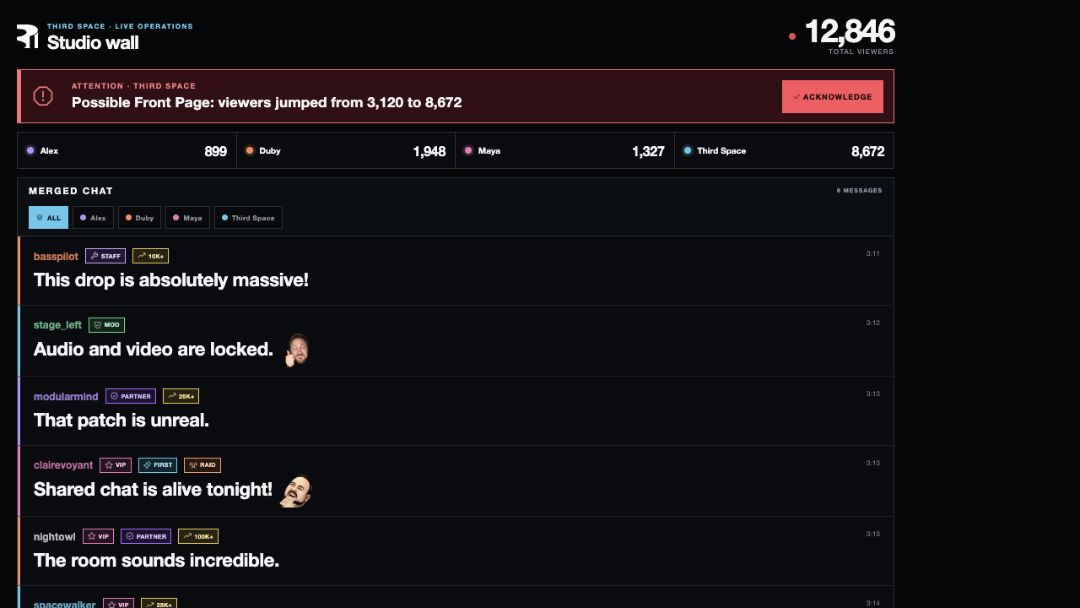
Studio Connect is the custom operations platform we use when a production runs on a guest's or customer's Twitch channel. It turns a sensitive channel handoff into a visible, revocable workflow for the guest and an operational view for the crew.
The usual channel handoff is too fragile
A live production may need to verify channel status, coordinate broadcast details, monitor chat, respond to audience events or help manage a Stream Together session. Doing that through shared passwords, copied stream keys and last-minute permission changes creates uncertainty for everyone.
The creator should know what they are authorizing. The production team should know which channel is connected and what it can operate. The show should not depend on someone finding a credential in a message while the countdown clock is running.
What the guest does
Before or during check-in, a booked guest opens the Studio Connect guest page and chooses “Connect with Twitch.” Twitch handles the login and presents the permissions requested by the application. That is OAuth: the guest authorizes specific access without handing Third Space their Twitch password.
The authorization is attached to the Twitch account the guest chooses. The guest can later remove the connection from Twitch's Connections settings, and Twitch can invalidate or revoke the resulting access tokens.
This is still meaningful access to a production channel. Guests should read the Twitch authorization screen and connect only when the scope matches the production they have booked.
What the production team gains
Once the authorized channel is part of the current production, Studio Connect gives the crew a single place to coordinate the signals that otherwise live in separate browser tabs and dashboards. Depending on the booked workflow, that can include:
- the participating channel roster and current live status;
- viewer counts and channel-labeled chat activity;
- important Twitch events surfaced for the director or studio wall;
- agreed channel details and broadcast controls;
- Stream Together sessions and invitations;
- a focused operational view for the crew during the show.
The point is not to automate the creator out of their own channel. It is to let the production crew execute the agreed show while the creator performs, hosts or collaborates.
One view is a production advantage
A multi-channel show produces more information than a director can use raw. Every channel may have a different status, community and moment of activity. Studio Connect organizes those signals around the production instead of forcing the crew to treat every dashboard as a separate show.
That shared operational picture is particularly useful for co-streams. The team can see which participating channels are live, keep channel identities attached to chat and events, coordinate Stream Together and put the most useful information in front of the people running the room.
The platform boundary remains visible
Custom software should make platform limits clearer, not hide them. Twitch's Shared Chat is off by default and must be enabled by the Stream Together host inside Twitch. Studio Connect can help the crew coordinate the collaboration, but it does not pretend a third-party production tool owns every Twitch control.
The same principle applies to authorization. Twitch defines scopes for the access an application requests, and the guest can revoke the connection through Twitch. The guest-facing Studio Connect page does not publicly display a stream key.
Why we built instead of adding another dashboard
Third Space productions connect cameras, live audio, graphics, audience activity, creators and physical systems in the studio. Generic dashboards are useful for managing one account, but they are not designed around a director coordinating several creator channels inside one room.
Because we build web software as well as live productions, we can close that gap. Studio Connect is not a separate web-agency product. It is production infrastructure shaped by the problems we encounter in real shows: guest onboarding, channel authorization, multi-channel visibility, audience signals and clear crew handoffs.
When this workflow is useful
- a guest or customer wants Third Space to produce directly to their Twitch channel;
- several creators are live on their own channels inside one coordinated show;
- the producer needs live status, chat and important events in one view;
- the creator should stay focused on the performance rather than channel operations;
- access should be authorized through Twitch and removable later.
A simple single-channel stream may not need custom operations software. The differentiator appears when the format, number of channels or live stakes create a real coordination problem.