
Co-streaming can help creators reach beyond the audience they already know—but only when the collaboration is designed as a real show. The technology can connect channels and chats. It cannot invent chemistry, clarify the format or make viewers care.
At Third Space, we use co-streaming for productions where several creators are physically in the studio, live on their own Twitch channels at the same time and participating in one coordinated experience. Twitch’s Stream Together features and our own live-operations platform help us keep those channels connected without treating them as one generic feed.
Co-streaming is not the same as multistreaming
Multistreaming usually means sending the same program to several destinations—for example, one brand channel broadcasting to Twitch and another platform. The audience may be distributed, but the production still has one primary identity.
In the co-streaming model described here, multiple creators remain live on their individual Twitch channels. Each channel can preserve its own identity, moderation, audience relationship and presentation while participating in the same shared format.
What Twitch Stream Together actually provides
Stream Together is Twitch’s native collaboration system. Twitch describes it as a way for streamers to collaborate across multiple live channels or bring guests onto one channel. Streaming collaborators can use the call in their own broadcasts while choosing their own layouts and placements.
Shared Chat is a related feature inside Stream Together. When the host enables it, messages from participating communities appear in a combined chat experience. Viewers can see which community a message came from, while participating channels retain their own chat settings and moderation responsibilities.
Twitch also uses Shared Viewership for qualifying collaborations. It turns on when channels are in a Stream Together session with Shared Chat enabled, and Twitch says that combined viewership can affect how the participating streams are ordered on discovery surfaces. Twitch also makes clear that Shared Viewership does not count toward Path to Partner and does not change how many viewers see ads.
Why this can help creator channels grow
A collaboration creates a structured introduction between communities. A viewer who arrives for one creator can discover another creator inside a format they already chose to watch. Shared Chat makes that discovery social: viewers see reactions, references and relationships forming across channel lines.
The opportunity is stronger than a simple shout-out because the other creator has time to demonstrate why their channel is worth returning to. Their humor, expertise, performance style and community role become part of the show.
That still does not guarantee followers. Growth depends on audience fit, the quality of the format and whether each participant has a distinct contribution. Four creators doing the same job can feel crowded. Four creators with clear roles can create a show none of them could make alone.
Design one shared format, not four parallel streams
Start with the reason the creators are together. A co-stream needs a premise that requires collaboration: a live performance with rotating roles, a challenge, a critique, a reveal, a workshop, a competition or a conversation with genuine differences in point of view.
Then define what each channel’s audience should experience:
- Is every channel receiving the same program, or does each creator need a different composition?
- Who leads each segment, and how do the other creators contribute?
- When should the show acknowledge a specific channel’s chat?
- How will a viewer understand who the collaborators are and where to find them later?
- What happens when one channel drops, a creator steps away or Shared Chat is unavailable?
Those are show-design decisions first. The routing, graphics and software should make them easier to execute.
Give the production team one operational picture
Multiple creator channels create more signals to watch. A producer needs to know which channels are live, what each audience is doing, whether a collaboration session is active and where an important event originated.
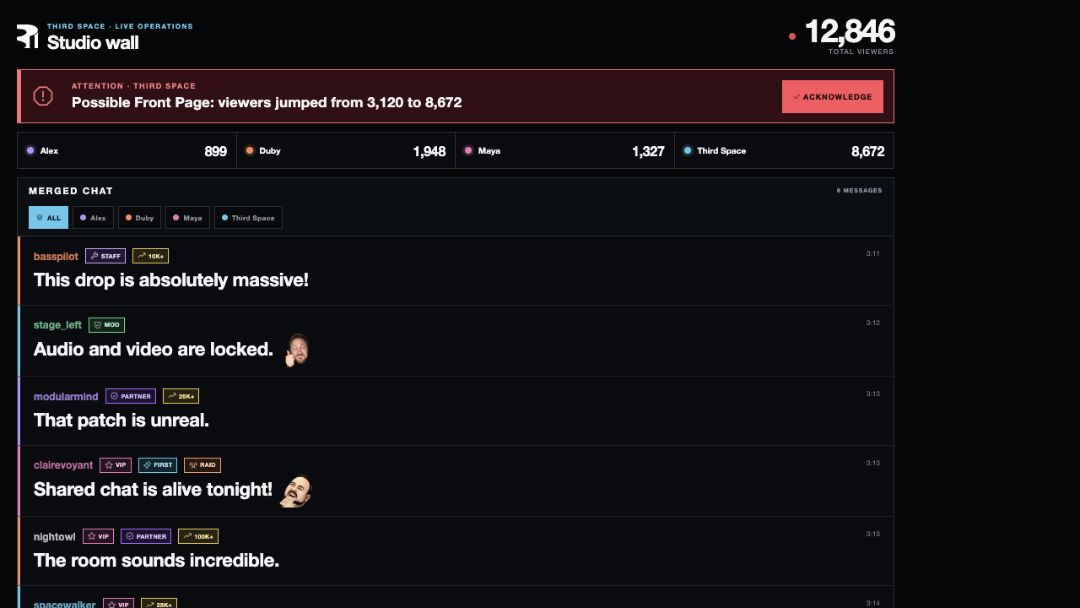
We built Third Space Connect around that problem. The platform can help the studio team:
- select the participating broadcaster accounts for the current show;
- create or find a Stream Together session and send invitations;
- preview participating channels and see their current viewer counts;
- combine chat and live events into one production-facing view while preserving channel labels;
- surface important alerts and audience activity in the control room and on the studio wall;
- connect selected live actions to physical control surfaces in the room.
There is an important boundary: Twitch does not provide a public API for a third-party tool to start Shared Chat. The host enables it in Twitch’s own Stream Together interface or with Twitch’s /sharedchat command. Good production software should make platform limits clear instead of pretending they do not exist.
Plan moderation before merging communities
Shared Chat creates one visible conversation, but it does not erase the participating channels’ moderation rules. Twitch explains that each channel’s settings continue to apply to messages sent from that channel, and moderators from participating channels can take certain actions during the shared session.
Before the show, decide who is moderating, how the teams communicate and what happens when community standards differ. Review bots and extensions too: Twitch notes that third-party applications operating in participating channels may be able to read and act on Shared Chat data.
Make the handoff between creators visible
Cross-community growth is easier when the collaboration helps viewers remember the other creators. Use spoken introductions, readable names, consistent graphics and moments that let each person demonstrate their own format.
After the stream, publish clips that preserve the collaboration instead of removing everyone except the largest channel. Tag and link collaborators accurately. Turn the strongest shared moment into a follow-up piece that gives a new viewer enough context to understand why the group worked.
Measure more than the combined viewer number
Shared Viewership can be useful for discovery, but the total is not the whole result. Review the effect on each participating channel:
- average and peak concurrent viewers by channel;
- new follows during and after the collaboration;
- returning viewers in the next several broadcasts;
- chat participation and cross-community interaction;
- clip, highlight and replay performance;
- whether viewers understood the collaborators and premise.
A collaboration is successful when it creates durable audience relationships—not just one larger number during one live window.
When co-streaming is the wrong format
Do not add channels simply to inflate the apparent scale. Co-streaming is a poor fit when the audiences have no meaningful overlap, the creators cannot share attention, the show has no clear reason for collaboration or the moderation plan is unresolved.
A strong single-channel production is better than a confusing multi-channel one. Use Stream Together when the collaboration changes the experience for the better and gives every community a real reason to be there.
Service and production proof